Build a Binary Classification Model
Target: Is the delivery “Late” (1) or “On Time” (0)?
Before using complex algorithms, we need a baseline model to compare against. A simple baseline is the “Majority Class” classifier, which always predicts the most frequent outcome.
Why? If 90% of deliveries are on time, a model with 90% accuracy might actually be doing nothing more than guessing “on time” every time. We have checked this baseline in the previous section and found that the majority class is “Delayed” at around 58%. So, our baseline model would predict “Delayed” for every delivery, giving us an accuracy of about 58%.
Install and Import Libraries
import pandas as pd
import numpy as np

from sklearn.model_selection import train_test_split
from sklearn.preprocessing import LabelEncoder
from sklearn.metrics import (
    classification_report,
    confusion_matrix,
    roc_auc_score,
    accuracy_score,
)

import xgboost
from xgboost import XGBClassifier
Check XGBoost version.
print(f"xgboost version: {xgboost.__version__}")xgboost version: 3.2.0
Load Data
df = pd.read_csv(
    "http://raw.githubusercontent.com/bdi593/datasets/main/amazon-on-time-delivery-data/on-time-delivery-data.csv"
)
dfPreprocess Data for Modeling
Select Features and Target
X = df.drop(columns=["classification_ontime"])
y = df["classification_ontime"]
Encode Target Variable to Integer
le = LabelEncoder()
y = le.fit_transform(y)

print(dict(zip(le.classes_, le.transform(le.classes_))))
{'Delayed': np.int64(0), 'On time': np.int64(1)}
Split Data into Train and Test Sets
The random_state parameter ensures that the split is reproducible, meaning you will get the same train and test sets every time you run the code. This is important for consistency when evaluating model performance. 42 is a commonly used value for random_state, but you can choose any integer.
X_train, X_test, y_train, y_test = train_test_split(
    X, y, test_size=0.2, random_state=42, stratify=y
)
The Inputs
X: Your feature matrix (independent variables).Example: zipcode, total_items,
y: Your target variable (dependent variable)."classification_ontime"
The Arguments
test_size=0.2: 20% of the data goes into the test set, and the remaining 80% goes into the training setSince we have 45,000 rows, this means:
36,000 rows for training
9,000 rows for testing
random_state=42: Controls randomness.Ensures the split is reproducible
If someone else runs this code with
random_state=42, they get the same splitThe number 42 is arbitrary (it’s just a seed), although it’s a popular choice in the data science community.
stratify=y: Ensures that the class distribution in the train and test sets is the same as in the original dataset.Example: If your original dataset has:
70% class 0
30% class 1
Then both training and test sets will also have:
70% class 0
30% class 1
Without stratification, you might get an imbalanced split.
⚠️ Only use
stratify=yfor classification tasks (not regression).
Outputs
The function returns 4 objects:
| Variable | Meaning |
|---|---|
X_train | Features for training |
X_test | Features for testing |
y_train | Labels for training |
y_test | Labels for testing |
Build Classifier
xgb_model = XGBClassifier(
    n_estimators=300,
    learning_rate=0.05,
    max_depth=4,
    subsample=0.8,
    colsample_bytree=0.8,
    objective="binary:logistic",
    eval_metric="logloss",
    random_state=42,
)

xgb_model.fit(X_train, y_train)Model Arguments (Parameters)
The arguments you pass when creating the XGBoost model are called hyperparameters. They control how the model learns from the data. Choosing the right hyperparameters can significantly affect your model’s performance.
| Parameter | Type | What It Controls | Effect on Model | Typical Range / Notes |
|---|---|---|---|---|
n_estimators | int | Number of boosting rounds (trees) | More trees → more complex model; can reduce bias but increase overfitting | 100-1000 common |
learning_rate | float | Step size shrinkage after each tree | Smaller values → slower learning, usually better generalization (needs more trees) | 0.01-0.3 |
max_depth | int | Maximum depth of each tree | Deeper trees → capture more complex patterns but risk overfitting | 3-10 typical |
subsample | float | Fraction of training samples used per tree | <1.0 adds randomness → reduces overfitting | 0.5-1.0 |
colsample_bytree | float | Fraction of features used per tree | Adds feature randomness → reduces overfitting | 0.5-1.0 |
objective | string | Loss function being optimized | Determines type of task (binary, multi-class, regression) | "binary:logistic" for binary classification |
eval_metric | string | Metric used to evaluate model performance during training | Does not affect training directly, just monitoring | "logloss", "auc", "error" common |
random_state | int | Seed for reproducibility | Ensures same random sampling each run | Any fixed integer |
Check Model Performance
After training the XGBoost classifier on the delivery dataset, we evaluate performance using several standard classification metrics.
Because this is a binary classification problem, no single metric tells the full story. Instead, we interpret accuracy, precision, recall, F1-score, and ROC-AUC together.
Generate Predictions
After training the XGBoost model (xgb_model) on the training data, we use the test data (X_test) to generate predictions.
The .predict() method of the XGBoost model returns the predicted class labels (0 or 1) for the test set. In binary classification, it will output 0 for “Delayed” and 1 for “On time”.
y_pred = xgb_model.predict(X_test)
y_pred
array([1, 1, 0, ..., 0, 0, 1], shape=(9000,))Generate Predicted Probabilities
Instead of returning class labels, predict_proba() returns the predicted probabilities of the output being the positive class (class 1, “On time”). For example, if predict_proba() returns 0.8 for a delivery, it means the model estimates an 80% chance that the delivery will be “On time” and a 20% chance it will be “Delayed”.
y_proba = xgb_model.predict_proba(X_test)[:, 1]
y_proba
array([0.9595251 , 0.92564267, 0.09984522, ..., 0.06963739, 0.48324838,
0.5433104 ], shape=(9000,), dtype=float32)Confusion Matrix
In binary classification, a confusion matrix is a table used to evaluate the performance of a predictive model. It goes beyond simple accuracy by showing exactly where the model is succeeding and where it is miscalculating.
The matrix compares the actual target values with the predicted values generated by the model.
| Term | Full Name | What It Means | In Our Dataset |
|---|---|---|---|
| TP | True Positive | Predicted 1 and actually 1 | Predicted on-time, and it arrived on time |
| TN | True Negative | Predicted 0 and actually 0 | Predicted delayed, and it was delayed |
| FP | False Positive | Predicted 1 but actually 0 | Predicted on-time, but it was delayed |
| FN | False Negative | Predicted 0 but actually 1 | Predicted delayed, but it arrived on time |
print("Confusion Matrix:")
print(confusion_matrix(y_test, y_pred))
Confusion Matrix:
[[4361 867]
[ 697 3075]]
Interpreting the Confusion Matrix
4361: True Negatives (TN) - The model correctly predicted “Delayed” for 4361 deliveries.
867: False Positives (FP) - The model incorrectly predicted “On time” for 867 deliveries that were actually “Delayed”.
694: False Negatives (FN) - The model incorrectly predicted “Delayed” for 694 deliveries that were actually “On time”.
3078: True Positives (TP) - The model correctly predicted "On time
Accuracy
Accuracy is the proportion of correct predictions out of all predictions.
In classification, we can use the confusion matrix to break down the predictions into four categories.
print("Accuracy:", accuracy_score(y_test, y_pred))Accuracy: 0.8262222222222222
If you randomly pick one delivery, there’s about an 82.7% chance that the model will correctly predict whether it was “On time” or “Delayed”.
“Out of all deliveries, how often was the model right?”
ROC-AUC
ROC-AUC measures how well your model separates the two classes across all possible thresholds.
It stands for:
ROC = Receiver Operating Characteristic
AUC = Area Under the Curve
The ROC curve plots True Positive Rate (TPR) and False Positive Rate (FPR) for every possible threshold.
True Positive Rate (Recall)
This measures the proportion of actual positive cases (on-time deliveries) correctly identified.
False Positive Rate
This measures the proportion of actual negative cases (delayed deliveries) that were incorrectly predicted as positive.
AUC is the area under the ROC curve, which ranges from 0 to 1. A model with an AUC of 0.5 has no discriminative ability (equivalent to random guessing), while a model with an AUC of 1.0 perfectly separates the classes.
| AUC | Interpretation |
|---|---|
| 0.5 | Random guessing |
| 0.7-0.8 | Fair |
| 0.8-0.9 | Good |
| 0.9-1.0 | Excellent |
| 1.0 | Perfect |
print("ROC-AUC:", roc_auc_score(y_test, y_proba))ROC-AUC: 0.9078464997188643
This means that the model has excellent ability to distinguish between “On time” and “Delayed” deliveries across all thresholds.
If you randomly select one on-time delivery and one delayed delivery, the model assigns a higher predicted probability to the on-time delivery about 90.8% of the time.
Other Metrics
The classification_report() function from scikit-learn provides additional metrics like precision, recall, and F1-score for each class. These metrics can give you more insight into the performance of your model.
print("Classification Report:")
print(classification_report(y_test, y_pred))
Classification Report:
precision recall f1-score support
0 0.86 0.83 0.85 5228
1 0.78 0.82 0.80 3772
accuracy 0.83 9000
macro avg 0.82 0.82 0.82 9000
weighted avg 0.83 0.83 0.83 9000
Precision
Precision answers:
When the model predicts this class, how often is it correct?
When the model predicts “delayed”, it is correct 86% of the time.
When the model predicts “on-time”, it is correct 78% of the time.
This is lower - meaning some delayed deliveries are being predicted as on-time (false positives).
Recall
Recall answers:
Out of all actual cases of this class, how many did we correctly identify?
The model correctly catches 83% of delayed deliveries (0).
The model correctly identifies 82% of on-time deliveries (1).
F1-Score
F1 is the harmonic mean of precision and recall. It balances false positives and false negatives. A high F1-score means the model has both high precision and high recall. In our case, the F1-scores for both classes are around 0.80-0.85, indicating good performance in identifying both on-time and delayed deliveries.
For class 0 (delayed), the F1-score is around 0.85, which indicates a strong overall performance for delayed deliveries.
For class 1 (on-time), the F1-score is around 0.80, which is slightly lower than for delayed deliveries. This is weaker than the F1-score for delayed deliveries, but still solid.
Support
Support = number of actual observations in each class.
Class 0 (Delayed): 5228
Class 1 (On-time): 3772
This tells you the dataset is moderately imbalanced (58% delayed, 42% on-time).
🎯 Business Interpretation
Your model:
Is stronger at predicting delays than on-time deliveries
Has slightly lower precision for predicting on-time (0.78)
Has balanced recall across both classes (~0.82-0.83)
Shows strong overall discrimination (AUC≈0.91)
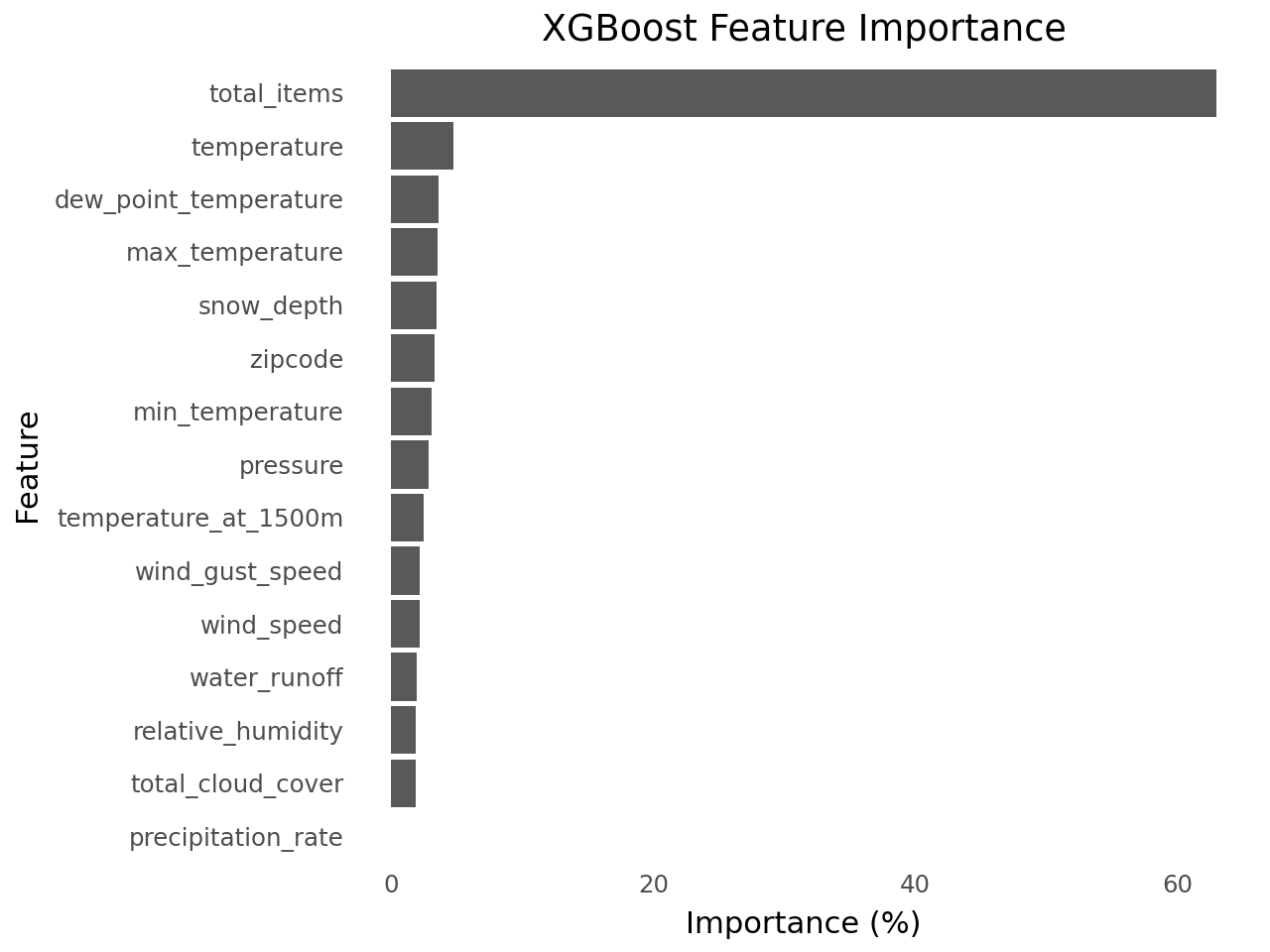
Check Feature Importance
importances = xgb_model.feature_importances_
features = X.columns

df_feat_imp = pd.Series(importances, index=features).sort_values().reset_index()

df_feat_imp.columns = ["feature", "importance"]
df_feat_imp["importance_pct"] = df_feat_imp["importance"] * 100

df_feat_impfrom plotnine import (
ggplot,
aes,
geom_col,
coord_flip,
labs,
theme_minimal,
theme,
element_blank,
)
(
ggplot(df_feat_imp, aes(x="reorder(feature, importance_pct)", y="importance_pct"))
+ geom_col()
+ coord_flip()
+ labs(title="XGBoost Feature Importance", x="Feature", y="Importance (%)")
+ theme_minimal()
+ theme(panel_grid_major=element_blank(), panel_grid_minor=element_blank())
)